🛡️ Enterprise & Consumer License Audit · Updated November 24, 2026

Windows & Office License Verification, KMS Security & Channel Guide 2026

Practical verification handbook for system administrators, IT auditors, and PC builders. Inspect Windows and Office license channels with native console commands, detect rogue KMS loopback emulators, and protect systems during Software Asset Management (SAM) reviews.

Lead Author: Research Fellow K. Vityuk, KeyAuditLab Last Verified: November 24, 2026 Standards: ISO/IEC 19770 SAM, Microsoft Product Terms, EU Directive 2009/24/EC
Editorial Independence & Funding: KeyAuditLab is an independent analytical lab. We do not sell Windows or Office product keys or act as a broker. Lab operations are supported by display advertising, clearly labeled affiliate links, and voluntary reader contributions; evaluations are never influenced by sponsorships and rely on direct test-bench validation of activation channels, registry telemetry, and statutory compliance rules.
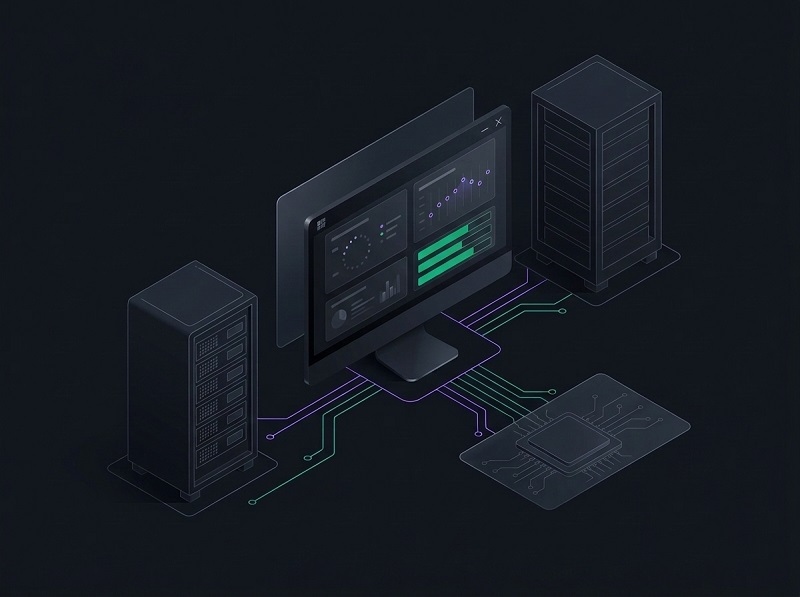
Enterprise workstation telemetry console showing Windows and Office software license compliance and hardware ID verification
CLI channel diagnostics, HWID firmware binding, and corporate SAM entitlement verification.
SAM STANDARD: ISO/IEC 19770 CLI DIAGNOSTICS: SLMGR / OSPP EU EXHAUSTION DOCTRINE: DOCUMENTED

⚡ 2026 Windows & Office Licensing Key Findings

1. Genuine Channel Verification Running slmgr.vbs /dli and slmgr.vbs /xpr confirms within seconds whether a Windows license is permanent Retail/OEM or a time-limited 180-day Volume KMS hook.
2. HWID & Transfer Rights OEM licenses bind permanently to the initial motherboard ACPI table and cannot be moved after hardware upgrades. Only Retail (FPP) keys carry transferability across PC builds.
3. Corporate Audit Proof A green "Activated" status in Windows Settings is not legal proof of ownership. Formal SAM reviews require purchase invoices, COA labels, or active Volume Licensing records in the Microsoft 365 Admin Center.

Enterprise Licensing Channels: Audit & Compliance Classification

Under ISO/IEC 19770 SAM standards, every workstation must maintain a verified licensing lineage. Here is how Microsoft licensing channels and resale rules map to corporate compliance audits:

OEM / SLIC Original Equipment Manufacturer (OA 3.0)

Non-Transferable

Injected directly into UEFI/BIOS ACPI tables (MSDM / SLIC). Legally tied to the initial motherboard. While fully legitimate for pre-built workstations (Dell, Lenovo, HP), OEM licenses cannot be reassigned to replacement hardware or repurposed for virtual desktop infrastructure (VDI) instances.

Retail / FPP Full Packaged Product (ESD / Boxed)

Transferable

Full transfer rights to new hardware upon deactivation of the prior installation. Includes full direct support from Microsoft. In enterprise environments, retail licenses are typically registered via corporate Microsoft Entra ID (Azure AD) or designated company accounts.

Volume (VL) MAK & KMS / ADBA Channel

Enterprise Agreement

Managed through the Microsoft 365 Admin Center (which replaced the retired VLSC portal in April 2024) under Enterprise Agreements, MPSA, or Microsoft Customer Agreements.
• MAK (Multiple Activation Key): Direct activation with Microsoft servers up to a contracted seat threshold. Reselling surplus MAK seats violates Microsoft Volume Licensing terms.
• KMS / ADBA: Workstations attempt renewal against an internal corporate KMS host every 7 days by default, resetting a 180-day activation validity window. Any workstation pointing to an external or loopback KMS host is an immediate compliance violation.

EU Law / CJEU EU Exhaustion Doctrine & Resale Chain

EEA Scope

Under EU Directive 2009/24/EC (CJEU UsedSoft ruling), perpetual retail and unbundled volume licenses may be resold within the EEA only if the prior owner permanently uninstalls the software and provides a verifiable chain of initial purchase. Split multi-seat MAK pools and gray-market OEM strings without transfer documentation fail this legal test.

Office LTSC / 2021 Checking an Office MAK Key vs. Retail Suite

An Office MAK key activates Office LTSC 2024 or 2021 editions against Microsoft servers using a shared organization seat counter. If you bought a standalone Office key online and want to verify its origin, run ospp.vbs /dstatus:

  • • Genuine Consumer Retail: Prints RETAIL (for example, HomeBusiness2024Retail) and binds permanently to your Microsoft Account.
  • • Leaked Enterprise MAK Pool: Prints VOLUME_MAK (such as ProPlus2021VL_MAK). Once the parent organization's seat limit is exhausted or flagged, activation fails with 0xC004C003 or 0xC004C020.

Windows Licensing Service Qualifying OS Rule & SoftwareLicensingService

Under official Microsoft Corporation commercial Windows licensing terms, enterprise Volume Licensing media are upgrade licenses: each workstation must already hold a licensed Qualifying Operating System (QOS) such as OEM or Retail Windows Pro. To inspect the active Windows licensing service configuration directly in PowerShell, run:

Get-CimInstance -ClassName SoftwareLicensingService | Select-Object Version, KeyManagementServiceMachine, KeyManagementServiceListeningPort
🛡️ Interactive Diagnostic Tool · Updated 2026

Windows & Office License Channel Decoder

Select the exact channel string or KMS host address reported by slmgr.vbs /dli, slmgr.vbs /dlv, or ospp.vbs /dstatus to see its legal transferability, revocation exposure, and required remediation.

ISO/IEC 19770 Aligned
SAM & Security Verdict:

Compliant Transferable Retail License

Low Risk (5%)
Audit Non-Compliance or Revocation Risk: 5%

Retail (FPP/ESD) licenses activate permanently against Microsoft servers, support hardware transfers upon deactivation of the old device, and include official Microsoft support.

Recommended Technical & Audit Action:
  • âś“ Confirm permanence with "slmgr.vbs /xpr" showing "The machine is permanently activated."
  • âś“ Archive the purchase invoice and link the digital license to your Microsoft or Entra ID account.
Evaluated under Microsoft Product Terms and EU Directive 2009/24/EC. Compare OEM vs. Retail TCO →
📊 Channel Audit Matrix · November 2026 Cycle

Windows & Office License Type Comparison

Side-by-side comparison of technical bindings, official Microsoft support, and secondary market compliance signals.

Read OEM & 0xC004F050 Marketplace Audit →
License Channel Hardware Transfer slmgr /dli Tag MS Support Official MSRP vs. Secondary Market SAM Audit Verdict
Retail (FPP / ESD) Transferable RETAIL channel Full Direct $199.99 Official MSRP (Win 11 Pro) / ~$28.50 secondary Compliant With authorized invoice
OEM (OA 3.0 / System Builder) Locked to Motherboard OEM_DM / OEM_COA Hardware Vendor Only Bundled with PC / $14 to $24 secondary OEM key Fixed Hardware Only
Volume MAK (Resold Gray Key) Non-Transferable Pool VOLUME_MAK M365 Admin (VL Role) Only Unauthorized single-seat resale High Revocation Risk
KMS Emulator (127.0.0.1) 180-Day Spoof Loop VOLUME_KMSCLIENT None (Policy Breach) Pirated / Unlicensed Critical Security Violation
Office 2024 Home & Business (Retail) Transferable (MS Account) HomeBusiness2024Retail Full Direct $249.99 Official MSRP / ~$49.90 secondary Compliant With authorized invoice

Cybersecurity Threat Analysis: The Hidden Cost of KMS Activators

Technical Breakdown & Attack Vectors (KMSPico, AutoKMS, Activator Scripts)

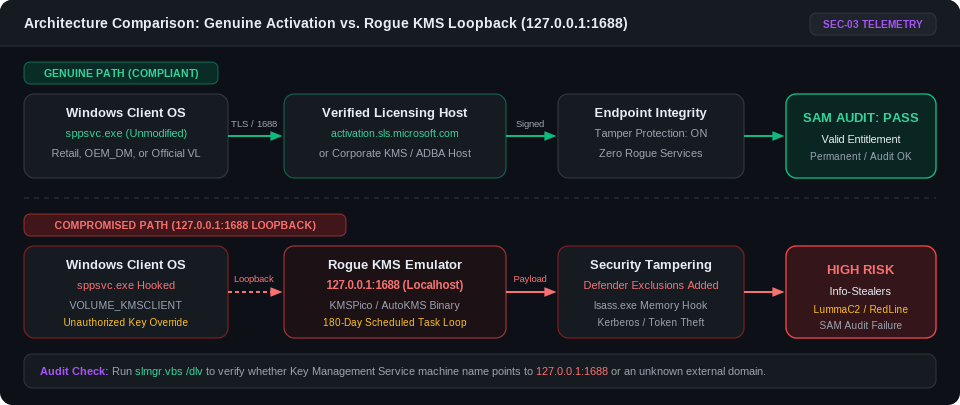
Third-party activation utilities bypass Microsoft’s Software Protection Platform Service (sppsvc.exe) by spoofing a local KMS server on localhost (127.0.0.1:1688). Threat intelligence from security firms (including Zscaler, Check Point, and Huntress) consistently documents that unofficial KMS activators are a primary distribution vector for persistent malware in corporate and personal networks.

Architecture diagram comparing genuine Microsoft activation flow against a rogue 127.0.0.1:1688 KMS loopback activator
Figure 3.1: Legitimate sppsvc.exe activation vs. localhost 127.0.0.1:1688 KMS spoofing and Defender tampering vector.

01. Credential & Token Stealers

Most pirated activator bundles drop infostealers such as RedLine, LummaC2, or Vidar. They harvest browser sessions, VPN certificates, saved passwords, and cryptocurrency wallets within seconds of initial execution.

02. Defender Tampering & Exclusions

Activators force users to disable Tamper Protection and automatically write permanent exclusions to Windows Defender (%ProgramFiles%\KMSPico). This leaves the host machine defenseless against lateral ransomware propagation.

03. Active Directory Compromise

When an employee runs a rogue activator on a domain-joined PC, malicious hooks inspect lsass.exe memory, extract Kerberos tickets, and establish unauthorized C2 channels back to attacker infrastructure.

Legal & Compliance Audit Section 04

Corporate Legal Liability & Statutory Audit Damages

During formal compliance enforcement actions (such as BSA | The Software Alliance audits under U.S. federal copyright law or European IP enforcement directives), commercial entities found utilizing unlicensed, cracked, or unauthorized volume keys face substantial financial and regulatory liability:

Statutory Penalties (U.S. Law) Under 17 U.S.C. section 504(c)(2), U.S. statutory damages can reach up to $150,000 per willfully infringed work, alongside comparable civil penalties under EU IP directives.
True-Up Retroactive Purchasing Settlements typically require buying full-price retail or enterprise licenses for all unverified installations without historical volume discount credits.
Auditor Fee Assessment The audited enterprise frequently bears third-party forensic audit costs and legal fees incurred during the compliance resolution.
âś“ Prevention Strategy: Maintain digital purchase invoices, active Volume Licensing agreements in the Microsoft 365 Admin Center, and OEM COA labels on file for all fleet assets.
Diagnostic Toolkit Section 05

Windows & Office CLI License Verification Toolkit

Open Command Prompt (cmd.exe) or Windows Terminal as Administrator and run the exact commands below. Prefixing with cscript //nologo prints text directly inside the console for audit logs.

Windows Channel Check CMD / PowerShell (Admin)

1. Verify Windows License Channel & Partial Key

Reveals the active Windows edition, last 5 characters of the installed key, license state (Licensed vs. Notification), and distribution channel (RETAIL, OEM_DM, VOLUME_MAK, or VOLUME_KMSCLIENT).

slmgr.vbs /dli
cscript //nologo %windir%\system32\slmgr.vbs /dli
KeyAuditLab Diagnostic Check:
• Genuine Consumer / SMB: Description prints RETAIL channel or OEM_DM channel.
• Unauthorized Pool / Emulator: Description prints VOLUME_KMSCLIENT on a standalone personal PC, or VOLUME_MAK on a key bought from a gray-market vendor.
Expiration Diagnostic CMD / PowerShell (Admin)

2. Verify License Permanence vs. 180-Day Countdown

Confirms whether Windows activation is permanent or relies on a hidden renewal timer. Many pirated installs show "Windows is activated" in Settings while actually expiring every 180 days.

slmgr.vbs /xpr
cscript //nologo %windir%\system32\slmgr.vbs /xpr
KeyAuditLab Diagnostic Check:
• Permanent Activation: Output states The machine is permanently activated.
• Temporary KMS Loop: Output states Volume activation will expire [Date/Time], indicating reliance on a scheduled KMS renewal task.
Deep KMS Audit CMD / PowerShell (Admin)

3. Inspect KMS Server Hostname, Port & Renewal Interval

Prints the verbose licensing descriptor including Activation ID, Installation ID, KMS server address, and renewal cadence. Essential when verifying used laptops or pre-installed business workstations.

slmgr.vbs /dlv
Red Flag Indicator:
If Key Management Service machine name points to 127.0.0.1:1688, localhost, or an unknown public domain (such as kms8.msguides.com), an unauthorized KMS activator or external spoofing server is active.
Office License Audit CMD (Admin)

4. Verify Microsoft Office 2024 / 2021 / LTSC Channel

Because slmgr.vbs /dli defaults to the Windows OS SKU, Microsoft Office desktop suites require querying the Office Software Protection Platform script (ospp.vbs).

cscript //nologo "%ProgramFiles%\Microsoft Office\Office16\ospp.vbs" /dstatus
cscript //nologo "%ProgramFiles(x86)%\Microsoft Office\Office16\ospp.vbs" /dstatus
Audit Check: Inspect LICENSE NAME and LICENSE DESCRIPTION (if Office16\ospp.vbs is missing on Click-to-Run builds, check %ProgramFiles%\Microsoft Office\root\Office16\ospp.vbs). Authentic consumer suites display HomeBusiness2024Retail; gray-market enterprise leaks show ProPlus2021VL_MAK or KMS_Client.
Fleet & Combined Audit PowerShell Script (Windows + Office)

5. Automated PowerShell CIM Query (Both Windows & Office)

Run locally or across multiple endpoints via PowerShell Remoting / RMM agents to inspect every active Windows and Office SKU in a single table without triggering popup windows:

Get-CimInstance SoftwareLicensingProduct | Where-Object { $_.PartialProductKey } | Select-Object Name, LicenseStatus, PartialProductKey, Description
Status Codes: LicenseStatus = 1 means Licensed; 2 = Initial Grace; 5 = Notification (unlicensed / revoked). Always inspect the Description column to confirm the expected channel.
KeyAuditLab Bench Comparison

Genuine Retail Output vs. Compromised KMS Activator Output

Compare your real terminal output from cscript //nologo %windir%\system32\slmgr.vbs /dli, /dlv (for KMS host details), and /xpr against our test-bench captures:

âś“ Pass: Genuine Retail / ESD Build Permanent Entitlement
Name: Windows(R), Professional edition
                        Description: Windows(R) Operating System, RETAIL channel
                        Partial Product Key: 3V66T
                        License Status: Licensed
                        
                        > slmgr.vbs /xpr
                        The machine is permanently activated.
âś• Fail: Rogue KMS Loopback / Unlicensed Pool SAM & Security Risk
Name: Windows(R), Professional edition
                        Description: Windows(R) Operating System, VOLUME_KMSCLIENT channel
                        Partial Product Key: T83GX
                        License Status: Licensed
                        Key Management Service machine name: 127.0.0.1:1688
                        
                        > slmgr.vbs /xpr
                        Volume activation will expire 5/19/2027 11:42:10 AM
Event Viewer Diagnostics

Auditing Event ID 5058 (Key Storage) vs. Application Logs

Security & SPP Logs

What Event ID 5058 means for licensing: When Windows Advanced Security Auditing (Audit Other System Events) is enabled, the Security log records Event ID 5058 (Key file operation) whenever a system service accesses cryptographic keys via the Microsoft Software Key Storage Provider under C:\ProgramData\Microsoft\Crypto\. Because sppsvc.exe uses cryptographic keys to validate Windows and Office license tokens (tokens.dat), seeing Event ID 5058 alongside activation checks is normal.

  • • Normal Telemetry: Audit Success with Return Code: 0x0 triggered by SYSTEM or NETWORK SERVICE.
  • • What to Flag: Non-zero return codes indicate corrupted key container permissions blocking licensing checks; unknown third-party processes reading key files warrant checking for unauthorized KMS hooks or infostealers.
  • • Do Not Confuse With Event ID 1042: Event ID 1042 in the Application log comes from MsiInstaller and only marks the end of an .msi installation or Office self-repair transaction (paired with Event ID 1040). Genuine Software Protection licensing failures appear under Microsoft-Windows-Security-SPP (e.g., IDs 902, 903, 1003, 1004) or Service Control Manager (7000 / 7034).
Inspect Event ID 5058 in PowerShell

Run in an elevated PowerShell prompt to review recent Key Storage Provider operations and verify Return Code values:

Get-WinEvent -FilterHashtable @{LogName='Security'; Id=5058} -MaxEvents 10 | Format-List TimeCreated, Message
If sppsvc crashes or reports access denied on key files, run sfc /scannow and verify permissions on MachineKeys.

Hardware Upgrades & HWID Binding

When you replace a motherboard or major CPU, Windows recalculates your Hardware ID. If the change exceeds Microsoft’s tolerance threshold, activation may fail with messages like hardware id binding is beyond level of tolerance, even though your digital license still exists on Microsoft’s servers.

  • • GPU and RAM swaps rarely trigger rebinding
  • • Motherboard replacement almost always exceeds tolerance
  • • Retail + Microsoft account: often recoverable via Activation Troubleshooter
  • • OEM licenses typically cannot move to new motherboard

Code-specific fix steps: 0x803FA071 and 0x803F8001. Full consumer guide:

Windows 10 change hardware IDs & reactivation guide →

Corporate SAM Audit Remediation & Best Practices

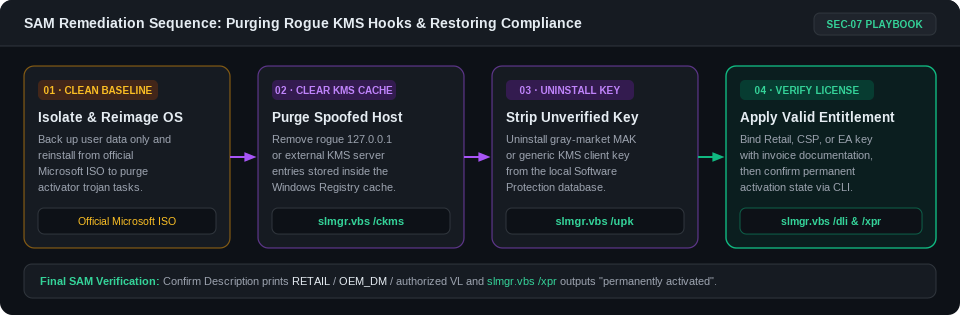
If an internal audit reveals unauthorized MAK keys or KMS activators, follow this standard remediation procedure to restore compliance before external vendor discovery:

1

Clean Host Reinstallation

Machines infected with activator binaries must be backed up (data only) and reimaged from official Microsoft installation media (ISO) to purge lingering trojans and backdoor registry hooks.

2

Clear KMS Registry Cache

Purge spoofed KMS host entries from the Windows registry using slmgr.vbs /ckms, followed by resetting product keys using slmgr.vbs /upk.

3

Procure Legitimate CSP/EA

Consolidate company licensing through certified Microsoft Cloud Solution Providers (CSP) with Microsoft 365 Business Premium or direct Enterprise Agreements with audit-ready proof of entitlement.

Four-step SAM remediation workflow from clean Microsoft ISO reinstallation through slmgr.vbs /ckms and /upk to final /dli and /xpr verification
Figure 7.1: Standard remediation order for clearing spoofed KMS hooks and restoring audit-compliant Windows and Office licensing.
Diagnostic Database Section 08

Activation Error Resolution (0x803FA071 & 0xC004C003)

During OS deployment or hardware lifecycle updates, workstations report standardized hex error codes. Here is the technical root cause and sysadmin command resolution:

0xC004C003 MAK Blocked

Activation Server Blocked Key

Occurs when a Volume MAK key has exceeded its contracted seat threshold or was flagged during Microsoft’s unauthorized resale audit passes. View full 0xC004C003 fix →

slmgr.vbs /ipk <ValidProductKey>

Hardware Changed or Seat Limit Exceeded

0xC004F211 fires after motherboard or major hardware swaps; 0x803FA071 signals a key already bound to another device limit. Use Activation Troubleshooter or offline portal aka.ms/aoh (with slui.exe 4 IID). View full 0x803FA071 fix →

start ms-settings:activation
0x8007232B DNS SRV Missing

KMS Host Not Found in DNS

Workstation is configured as a KMS client (VOLUME_KMSCLIENT), but cannot resolve the corporate KMS record (_vlmcs._tcp). View full 0x8007232B fix →

slmgr.vbs /skms <KMS_FQDN>:1688
Post-Audit Remediation · 14-Day Buyer Dispute Window

Need to Replace a Compromised KMS or Blocked Key? Choose the Right Channel

Once slmgr.vbs /dli flags a 127.0.0.1 KMS loopback or a revoked VOLUME_MAK pool, your next step depends on whether the machine belongs to an audited corporate fleet or a personal PC build.

Path A: Business & Formal SAM Audits

Use Official Microsoft CSP or Direct Retail

Organizations subject to ISO/IEC 19770 or BSA compliance reviews must avoid peer-to-peer secondary marketplaces. Official corporate billing records and Microsoft 365 Admin Center assignments are mandatory audit proof.

Go to Official Microsoft Licensing →
Path B: Personal PC Builders & Home Remediation

Why Our Lab Benchmarks Difmark Over Unmoderated Key Shops

  • 1. 14-Day Buyer Support & Dispute Escalation: Unlike opaque single-vendor CD-key sites with no neutral arbitration, Difmark enforces platform mediation where you can escalate a claim if a key fails activation or mismatches its listing.
  • 2. Seller Tier Filtering Before Checkout: You can reject zero-history accounts and choose high-volume top-rated sellers offering a direct 25-character key rather than a pre-owned account login.
  • 3. Works With Your CLI Audit Proof: Run slmgr.vbs /dli and /xpr immediately after activating. If a seller delivers VOLUME_MAK instead of RETAIL, your terminal output serves as concrete dispute evidence inside the 14-day window.

* Transparency Notice: This is a sponsored partner link. Always review our Buyer Safety & Escrow Rules before checkout. If you choose to purchase a personal replacement key through Difmark, KeyAuditLab may earn a referral commission at no extra cost to you. For formal corporate SAM compliance, always procure directly through Microsoft CSP or Enterprise agreements.

âť“ Enterprise Compliance Intelligence

Frequently Asked Questions (FAQ)

Key technical questions, legal definitions, and PowerShell commands governing Microsoft Windows and Office Software Asset Management (SAM) compliance.

What is the technical and security risk of using KMS emulator activators in a corporate network? â–Ľ

KMS emulators (such as KMSPico or AutoKMS) install unauthorized local background services that hook the Software Protection Platform service (sppsvc.exe) and direct traffic to loopback address 127.0.0.1:1688.

Threat intelligence from cybersecurity vendors consistently shows that pirated KMS tools are heavily repackaged with info-stealers (RedLine, LummaC2, Vidar), require disabling Windows Defender tamper protection, and create backdoors that expose corporate Active Directory domains to lateral movement.

How can a system administrator verify genuine Windows license status via command line? â–Ľ

Administrators can run slmgr.vbs /dli in elevated Command Prompt or PowerShell to view the product key channel (RETAIL, OEM_DM, VOLUME_MAK, or VOLUME_KMSCLIENT) and slmgr.vbs /xpr to verify whether the activation is permanent or bounded by a 180-day volume renewal counter.

Running slmgr.vbs /dlv reveals the authentic KMS host hostname or IP.

What is the difference between Windows OEM and Retail licenses for enterprise upgrades? â–Ľ

Retail (FPP): Full license transferable across different PCs and motherboards upon prior deactivation, with official Microsoft direct enterprise support.

OEM (Original Equipment Manufacturer): Bound to the machine’s initial motherboard ACPI MSDM/SLIC firmware tables. They legally terminate when the motherboard is decommissioned and cannot be repurposed for virtual desktop infrastructure (VDI). See our complete Microsoft OEM vs Retail License comparison and 6-year TCO guide for procurement decisions.

What are the legal liabilities of unverified Microsoft licenses during a corporate SAM audit? â–Ľ

During formal Software Asset Management (SAM) or BSA audits, organizations found utilizing unverified volume licenses or unauthorized keys face retroactive licensing true-up fees, statutory damages up to $150,000 per willfully infringed work under U.S. copyright law (17 U.S.C. section 504(c)(2)) or equivalent civil copyright penalties in other jurisdictions, and potential executive liability.

Can a leaked Volume MAK key be permanently used on an individual workstation? â–Ľ

No. Multiple Activation Keys (MAK) are contractual components of enterprise volume licensing agreements. When leaked onto secondary channels, Microsoft’s activation telemetry identifies abnormal geographic concurrency and revokes the key pool, resulting in activation errors like 0xC004C003 or 0xC004C020.

How should an infected host with an active KMS loopback be remediated? â–Ľ

System administrators should isolate the endpoint, clear the KMS host registry entries using slmgr.vbs /ckms, uninstall the product key with slmgr.vbs /upk, and reimage the workstation from official clean Microsoft ISO media to ensure that credential-stealing backdoors and scheduled tasks are completely eradicated.

What does Windows Event ID 5058 mean during a licensing audit, and is it related to Event ID 1042? â–Ľ

Event ID 5058 (Key file operation) in the Security log records Microsoft Software Key Storage Provider operations when system services such as sppsvc.exe read cryptographic key files in C:\ProgramData\Microsoft\Crypto. An Audit Success entry with Return Code 0x0 is normal behavior, whereas non-zero return codes indicate key storage permission errors.

By contrast, Event ID 1042 in the Application log comes from MsiInstaller and simply marks the end of an MSI installer transaction rather than a Windows Software Protection Platform licensing failure.

What is an Office MAK key, and how do I check if Office is Retail or MAK? â–Ľ

An Office MAK key (Multiple Activation Key) is an enterprise Volume Licensing key for editions like Office LTSC 2021 or 2024 that activates up to a contracted seat limit managed in the Microsoft 365 Admin Center. Run cscript //nologo "%ProgramFiles%\Microsoft Office\Office16\ospp.vbs" /dstatus in elevated Command Prompt: genuine consumer keys display RETAIL (such as HomeBusiness2024Retail), while enterprise pool keys display VOLUME_MAK and fail with error 0xC004C003 if resold outside an organization’s volume agreement.